Garden Planning Guide: Your All-in-One Tool for Smarter, Stress-Free Gardening
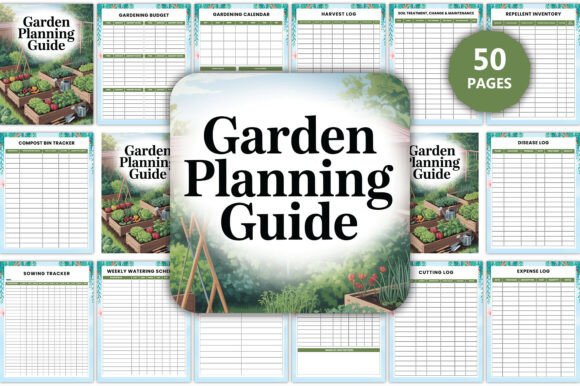
Whether you’re growing your first tomato vine on a sunny balcony or managing a quarter-acre food forest, a thoughtful Garden Planning Guide isn’t just helpful—it’s essential. Unlike generic calendars or scattered notes, this guide brings structure to the chaos of seasonal change, plant needs, and daily upkeep. It’s not about perfection; it’s about intentionality—tracking what you sow, when you water, how pests respond, and where sunlight falls week after week. And with the editable Garden Planning Guide interior, you’re not locked into someone else’s system. You get full control—customizable layouts, adaptable templates, and professional-grade files ready for Canva, PDF, or print.
Why “Just a Calendar” Isn’t Enough
Many gardeners start with a simple planting calendar—and stop there. They assume knowing *when* to plant solves everything. But timing alone doesn’t tell you *where* to rotate crops, *how much* compost your raised bed needs this month, or whether that basil is struggling from overwatering or poor airflow. Without integrated tracking—like a Sunlight Tracker, Soil pH Tracker, or Pest & Disease Log—you’re flying blind. Misdiagnosing yellow leaves as nutrient deficiency (when it’s actually root rot) wastes time, money, and momentum. A true Garden Planning Guide connects the dots: sowing dates inform harvest logs, which feed into your Monthly Garden Goals, which shape your Garden Shopping List.
Common Oversights That Undermine Even the Best Tools
Assuming “editable” means “effortless.” Some planners promise Canva editing but deliver low-res JPEGs or ungrouped layers—making text changes clunky or impossible. Others include 30+ pages but bury critical tools like the Fertilizer Tracker or Compost Bin Tracker in hard-to-find tabs. That leads to underuse—or worse, abandonment mid-season.
Ignoring layout logic. A beautiful Bed Plan or Garden Layout won’t help if your Plot Plan doesn’t match your actual space. One gardener spent weeks designing an ideal flower border in Canva—only to realize their south-facing wall cast shade exactly where her sun-loving zinnias were mapped. She’d skipped the Sunlight Tracker step. The fix? Walk your space at 9 a.m., 1 p.m., and 4 p.m. on a clear day, then mark zones directly on your editable Garden Layout template.
Treating maintenance as static. A Garden Maintenance Checklist isn’t set-and-forget. Soil amendments shift with rainfall. Pest pressure spikes after warm rains. If your planner lacks a Plant Care Change Log or Soil Treatment, Change Maintenance section, you’ll repeat errors—like applying the same fungicide twice without checking resistance patterns or soil biology impact.
What to Check Before You Commit
Before downloading or buying any Garden Planning Guide, ask yourself three things:
- Is every tracker tied to action? For example: Does the Sowing Tracker link to your Seed Packet Info page? Does the Harvest Log auto-feed your Expenses Log and Wishlist? If not, you’ll manually copy data—and skip logging altogether.
- Does it scale with your growth? Beginners need clarity—not clutter. A robust Plant List with space for notes works better than 50 pre-filled rows of obscure heirlooms. Professionals benefit from layered tools like the Cutting Log and Plant Propagation Log, but only if they’re intuitive—not buried behind icons or jargon.
- Are file formats truly usable? “High-quality PDF” means crisp vector text—not pixelated scans. “Editable in Canva” means grouped, labeled layers—not flattened PNGs. Test the sample: try changing a date in the Weekly Watering Schedule. If it takes more than two clicks, reconsider.
Better Choices Start With Intentional Use
Don’t wait until spring to open your Garden Planning Guide. Start now—even in winter—with your Yearly Overview and Seasonal Tasks. Map out your biggest bottleneck: Is it remembering when to divide perennials? Then prioritize the Monthly Tasks and Plant Care Guide sections. Struggling with inconsistent yields? Lean into the Soil Treatment, Change Maintenance and Soil PH Tracker combo—testing before planting, not after failure.
Use the Garden Equipment List not just as inventory—but as a maintenance cue. Add service dates next to pruners or drip timers. Pair the Wildlife Spotting log with your Repellent Inventory: notice more deer tracks near your kale? Adjust repellent rotation *before* damage appears.
And don’t overlook the human side: the House Plant Related Tasks and Weekly Garden Planner keep indoor and outdoor care aligned. One urban educator uses her Weekly Flower Tracker to plan student-led pollinator observations—turning data collection into classroom engagement.
Real Results Come From Consistent, Context-Aware Tracking
A Garden Planning Guide earns its value not in how many pages it has—but how often you reach for it. The Compost Bin Tracker helps you balance greens and browns *before* your pile goes slimy. The Weed Control Log reveals which mulch worked best *in your soil*, not someone else’s blog post. The Expense Log and Harvest Log together answer the quiet question: “Is this garden saving me money—or costing me time I can’t spare?”
You don’t need every tracker active at once. Start with three: your Planting Calendar, Watering Schedule, and Garden Checklist. After two weeks, add one more—say, the Disease Log—if you spot early blight on tomatoes. Let your real-world needs shape your system, not the other way around.
This isn’t about rigid adherence. It’s about building awareness—of your space, your plants, your time, and your goals. With an editable Garden Planning Guide, you’re not just following a plan. You’re refining it, season after season, with confidence, clarity, and calm.